
AnyDesk Verification Guide
Step-by-step AnyDesk setup guide for PC verification on Nexilium.
1
Download AnyDesk
Download the official client: AnyDesk from the official website.
2
Launch the Application
Open the downloaded AnyDesk.exe file. Installation is not required; the program works immediately upon launch.
3
Copy Desk Address
In the center of the window under "This Desk", you will find your 9-10 digit address code. Click on the digits to copy them to your clipboard automatically.

4
Send Code in Minecraft
Switch back to Minecraft and paste your code into the game chat to the moderator using Ctrl+V.
5
Accept Connection & Configure Permissions
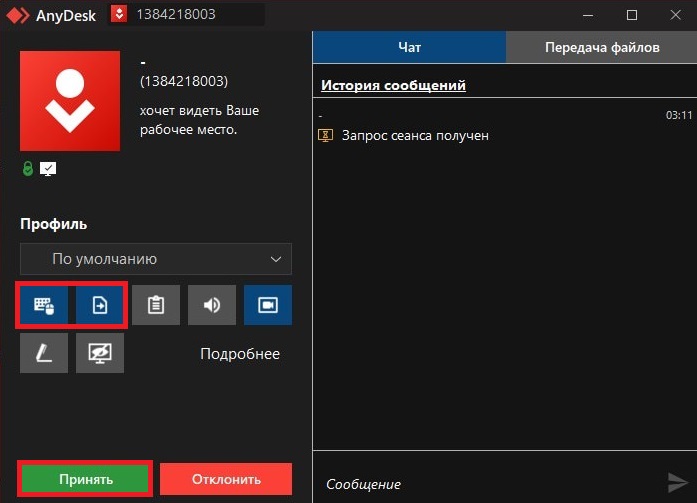
An incoming connection prompt will appear in AnyDesk. Disable all permissions except the item indicated in the screenshot below (keyboard/mouse control). Then click the green "Accept" button.
6
Verification in Progress
The verification session begins. Do not touch your mouse or keyboard during the inspection so as not to interfere with the moderator. If you need to ask a question, use the in-game chat.
Cheat verification utilities
These utilities may be used by the moderation team during verification to inspect the system for unauthorized software: